Header Cover Image

What's New at Trade Licks

Here are the latest updates, features, and announcements to help you master your trading edge.

January 10, 2026

Platform Update: Precision Growth Planning & A Sleeker Interface

A showcase of the new growth plan features and visual overhaul

We've rolled out a massive update across the entire platform. From a sleek visual redesign to powerful new projection logic, we are giving you more control over your trajectory and making your daily workflow faster than ever.

Growth Plans: Smarter Projections

The Growth Plan tool has been upgraded with realistic scaling strategies that benefit every type of trader.
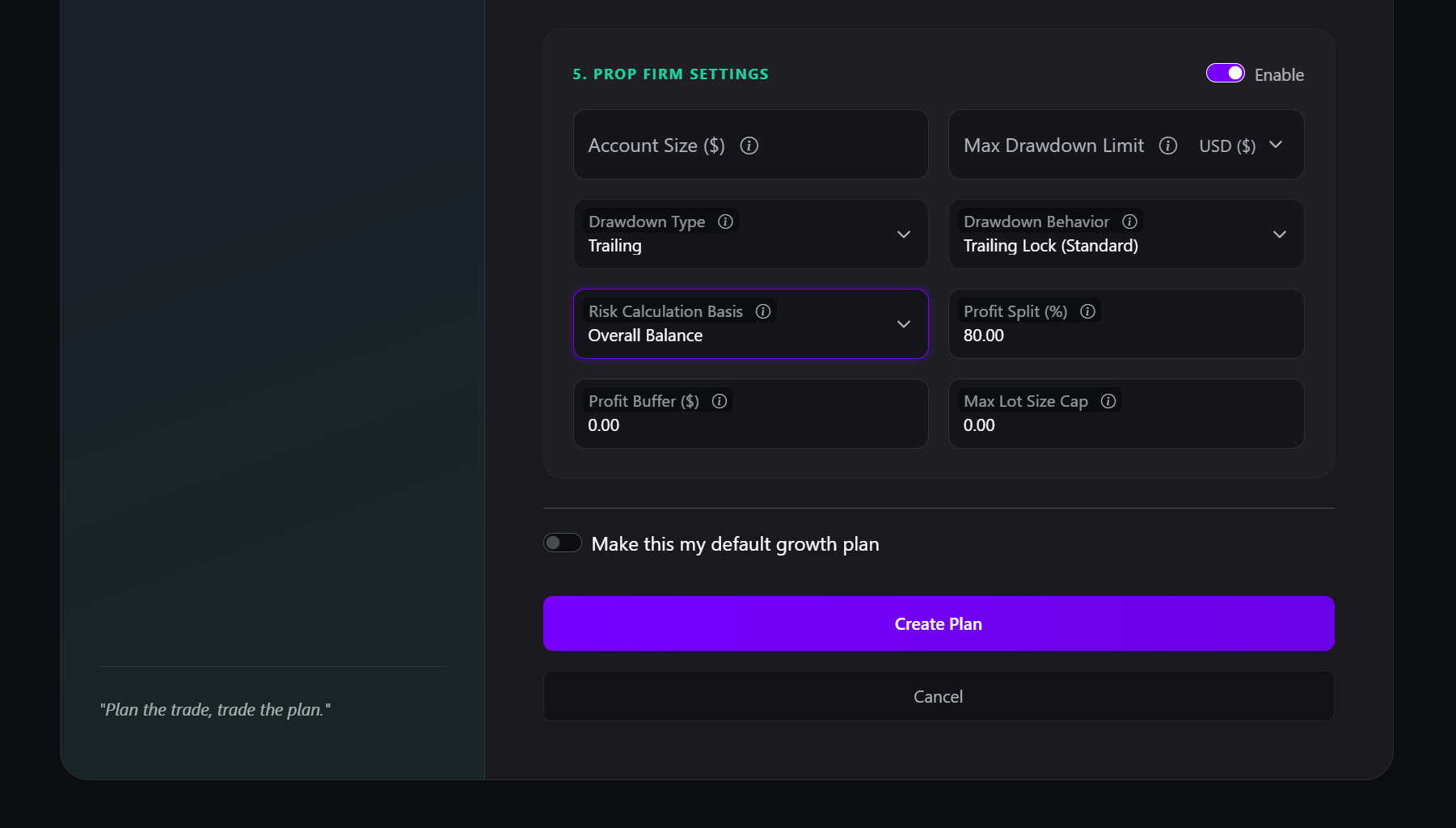
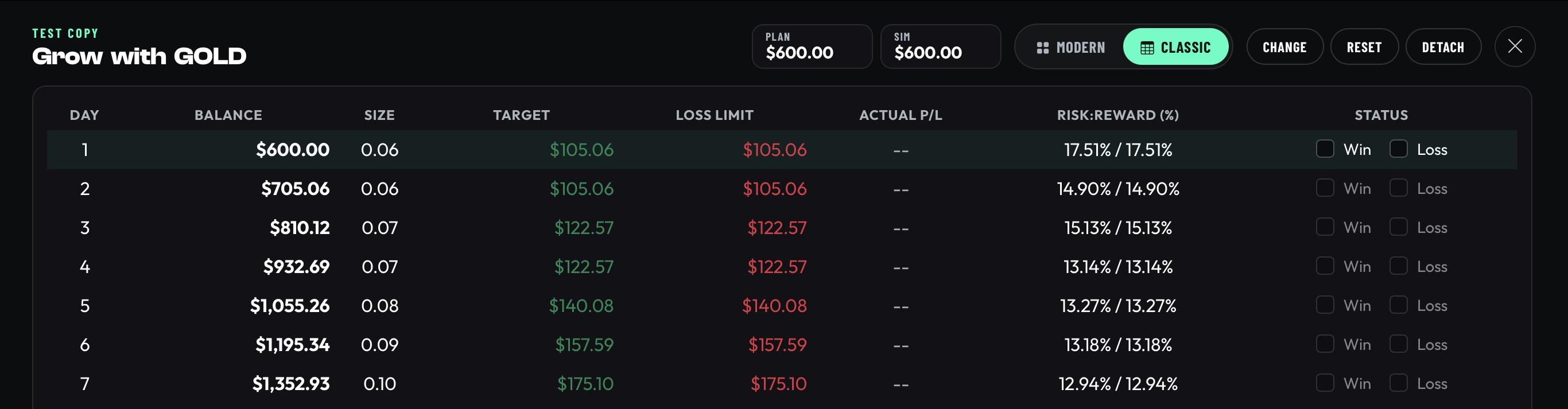
Demonstration of the new growth plan settings
  • New "Gradual Scale" Mode: Now the recommended default for all plans. Unlike Fixed Risk (aggressive compounding), Gradual Scale automatically lowers your risk percentage as your account grows. This allows you to steadily increase your lot sizes while actively protecting your capital.
  • Prop Firm Controls: For our prop firm traders, we've added a Max Lot Cap setting to ensure your plan never suggests a trade size that violates your firm's rules.
  • Flexible Drawdown Units: In addition to dollar amounts, we have added the option to set your Max Drawdown limits as a Percentage (%) directly inside the Prop Firm settings.
  • Risk Calculation Basis: You can now choose whether your risk percentage is calculated against your Total Balance or just your Available Drawdown, ensuring you never over-leverage relative to your breach limit.

Frictionless Journaling & Design

We have streamlined the core journaling workflow to reduce clicks, clear visual noise, and help you focus on the data that matters.
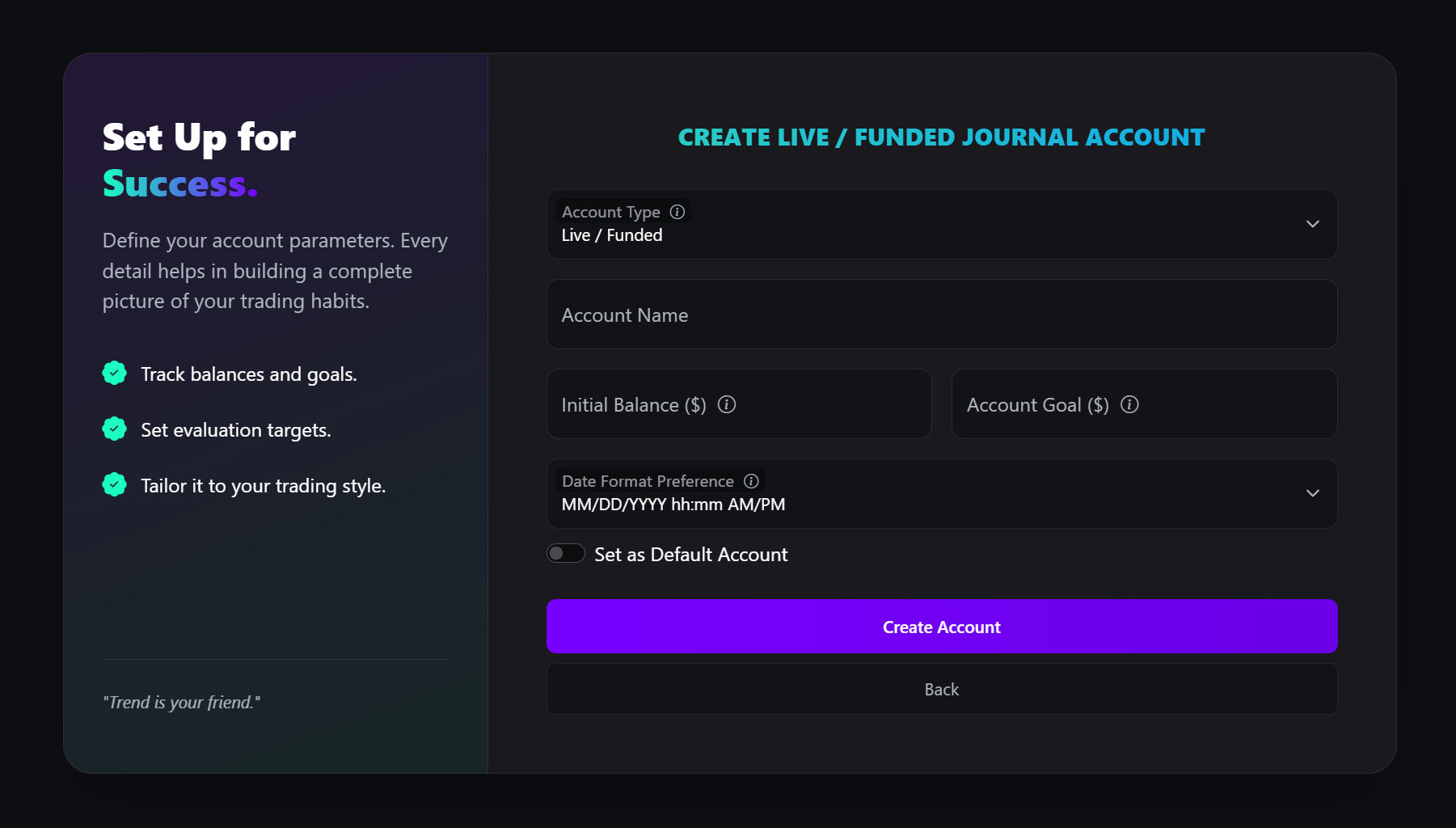
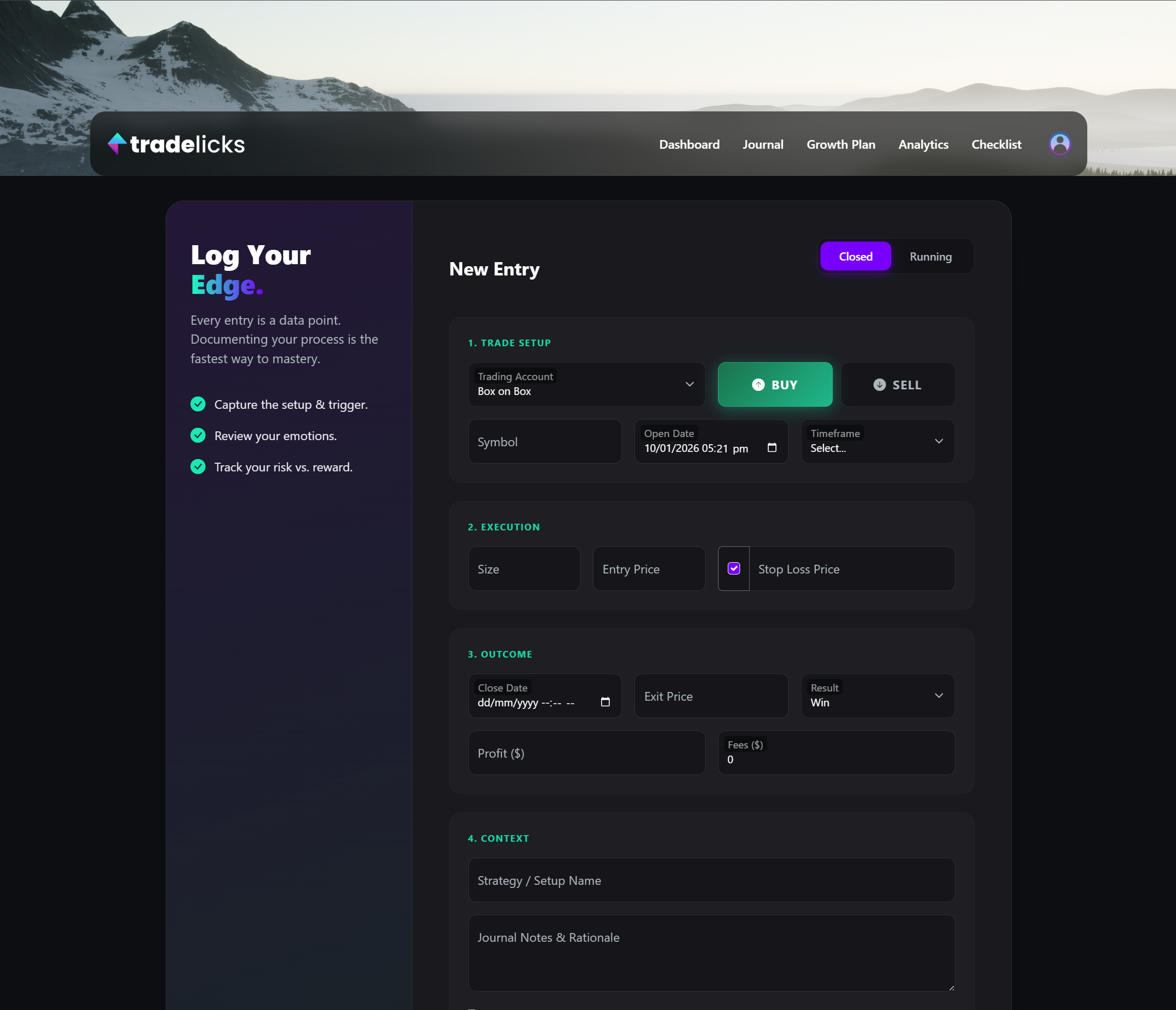
Demonstration of the new smart forms and toggle buttons
  • Smart Inputs: Forms now feature Floating Labels that tuck away neatly when you type, keeping your workspace clean.
  • Streamlined Entry: We've completely rebuilt the trade logging form for speed. With a reorganized layout, quick-action controls, and dynamic behaviors that adapt to your trade details, capturing your data is now faster and distraction-free.
  • Contextual Guidance: We’ve added interactive info icons next to complex settings. Hover over them for instant explanations of terms like "Trailing Lock" or "Risk Basis."

These updates are designed to make your daily routine smoother and your long-term planning more accurate. Dive into the new Growth Plan settings to see the difference!

December 22, 2025

Christmas Flash Sale - GET 50% OFF - Coupon Code: TL12

Get 50% off your first 12 Months. Offer ends Dec 28th. Use Coupon Code TL12 at checkout.
Already a member?… share this with your friends and family.

We wish you a very Merry Christmas.

December 21, 2025

New Features: Dashboard Additions

A showcase of the new Journaling Streak and Focus features

We're excited to announce three new Dashboard features designed to help you build consistency, stay focused, and control your data: Journaling Streaks, Focus of the Week, and the Review Stats Toggle!

Keep the Fire Burning: Journaling Streaks

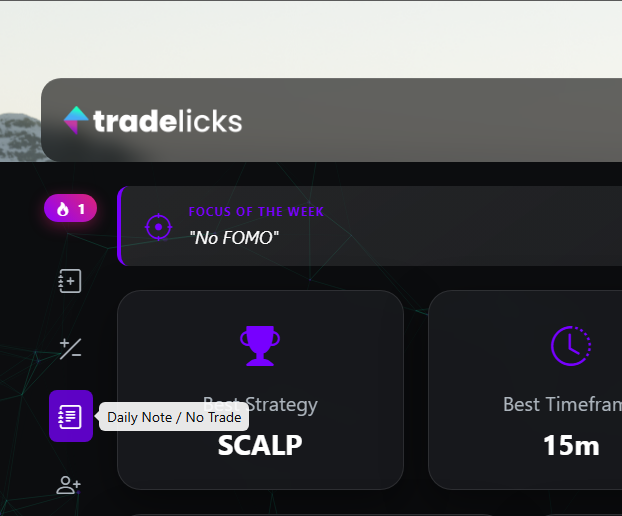
Building a habit requires showing up every day. We've added a Journaling Streak counter to your home toolbar to track your consistency.

Consistency doesn't always mean trading; sometimes the best trade is the one you don't take. To make maintaining your streak easier, we've added a Quick Note / No Trade button () to the dashboard toolbar. Clicking this allows you to instantly log a "No Trade" day or a quick psychology note in seconds without navigating away. This counts as activity, keeping your streak alive even on days you stay on the sidelines.

Stay on Target: Focus of the Week

Distractions are the enemy of execution. The new Focus of the Week widget allows you to pin a single, overriding goal or rule to the top of your dashboard.

Whether it's "No FOMO entries" or "Wait for the 15m close," your primary objective is now the first thing you see when you log in, keeping your mind primed for disciplined execution.

Your Data, Your Way: Review Stats Toggle

We know many of you trade a mix of Live accounts and Evaluation/Practice accounts. You now have full control over how your main dashboard calculates performance.

Found in the Dashboard Settings (gear icon), the new Include Review Stats toggle lets you decide if your dashboard totals should include all accounts or strictly your Live/Funded performance. Toggle it off for a pure view of your realized P/L, or on to see your total progress across the board.

Dive in and start building your streak today! We’re already hard at work on the next wave of features to help you master your edge, so watch this space—there is plenty more to come. Happy trading!

November 22, 2025

Black Friday Deal - GET 50% OFF - Coupon Code: TL12

Get 50% off your first 12 Months. Offer ends Dec 4th. Use Coupon Code TL12 at checkout.

October 15, 2025

New Feature Launch: Account Overview & Trading Day Start Time

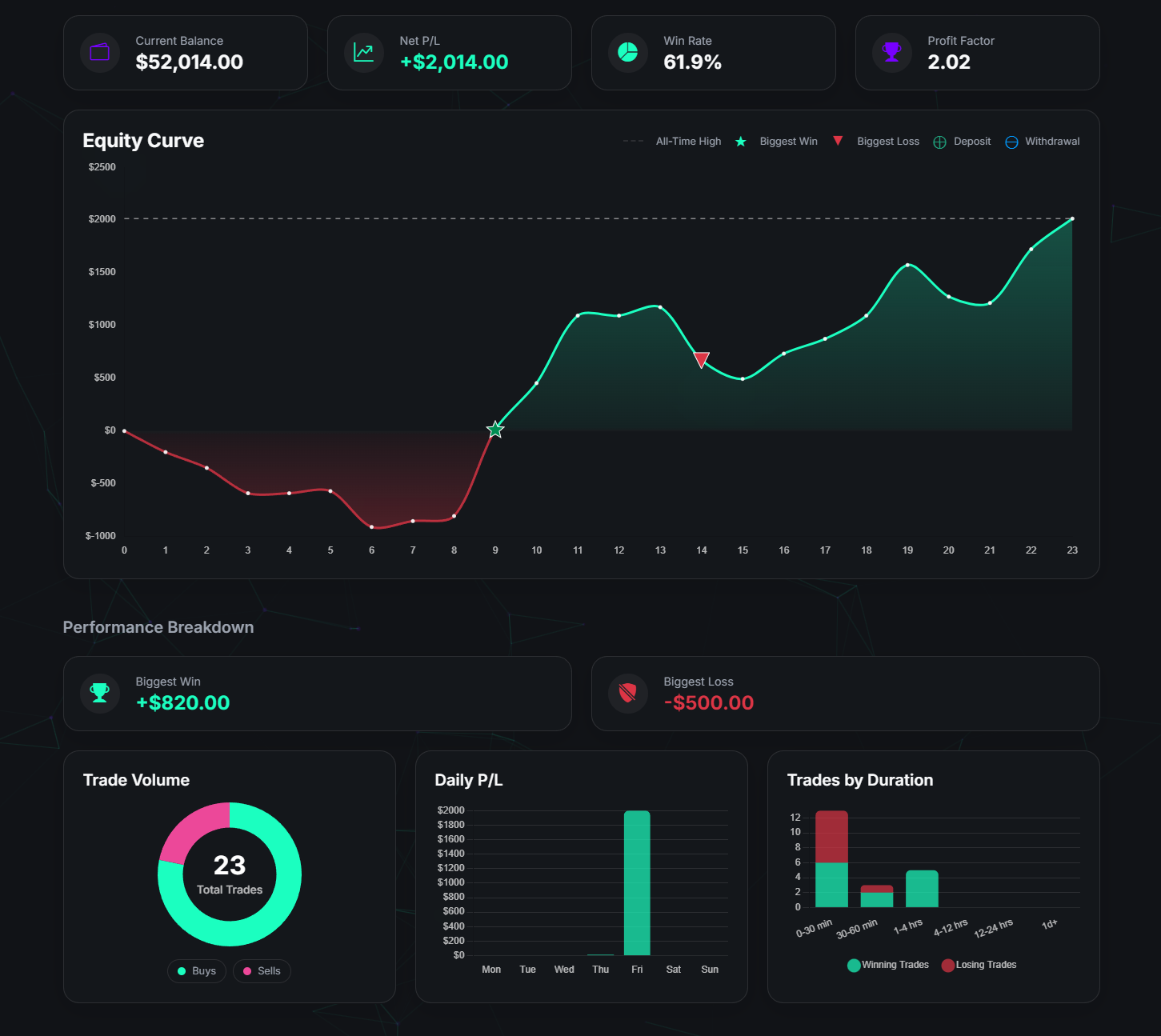
A showcase of the new Account Overview Dashboard

We're excited to announce two powerful new features designed to give you deeper insights and more control over your journal: the dedicated Account Overview page and the customizable Trading Day Start Time setting!

Deep Dive into Each Account: The New Overview

Ever wanted to analyze the performance of a single account in isolation? Now you can! The new Account Overview is a dedicated dashboard for each of your trading accounts, packed with detailed analytics that were previously only available in aggregate.

You can access this new dashboard by clicking on any of your account cards on the main Dashboard, or by clicking the Overview button at the top right of the Journal page when an account is selected.

This focused view includes:

  • A detailed Equity Curve for the specific account, including markers for your biggest trades, deposits, and withdrawals.
  • In-depth Performance Breakdown charts, showing your trade volume, daily P/L, and performance by trade duration.
  • A complete history of Goals and Capital Movements for the account.
  • And much more, giving you a complete 360-degree view of each account's journey.

Take Control of Your Calendar: Trading Day Start Time

For our Forex and Futures traders, we know that a "trading day" doesn't always end at midnight. This new setting solves that problem, ensuring your performance is grouped exactly how you trade.

Found in Session Management, this setting lets you define when your day officially begins. For example, if you set your start time to 10:00 AM, any trade closed before then (like at 3:00 AM Tuesday) will now correctly appear on Monday's calendar results, giving you a true picture of your session's performance.
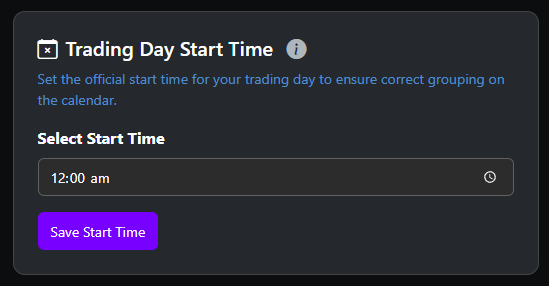
    

 A showcase of the new Trading Day Start Time setting on the Session Management page


Learn more about how to use the Trading Day Start Time...


These updates are live now and are designed to provide more precision and power to your analysis. We're excited to see how you use them to refine your edge. Happy trading!

October 3, 2025
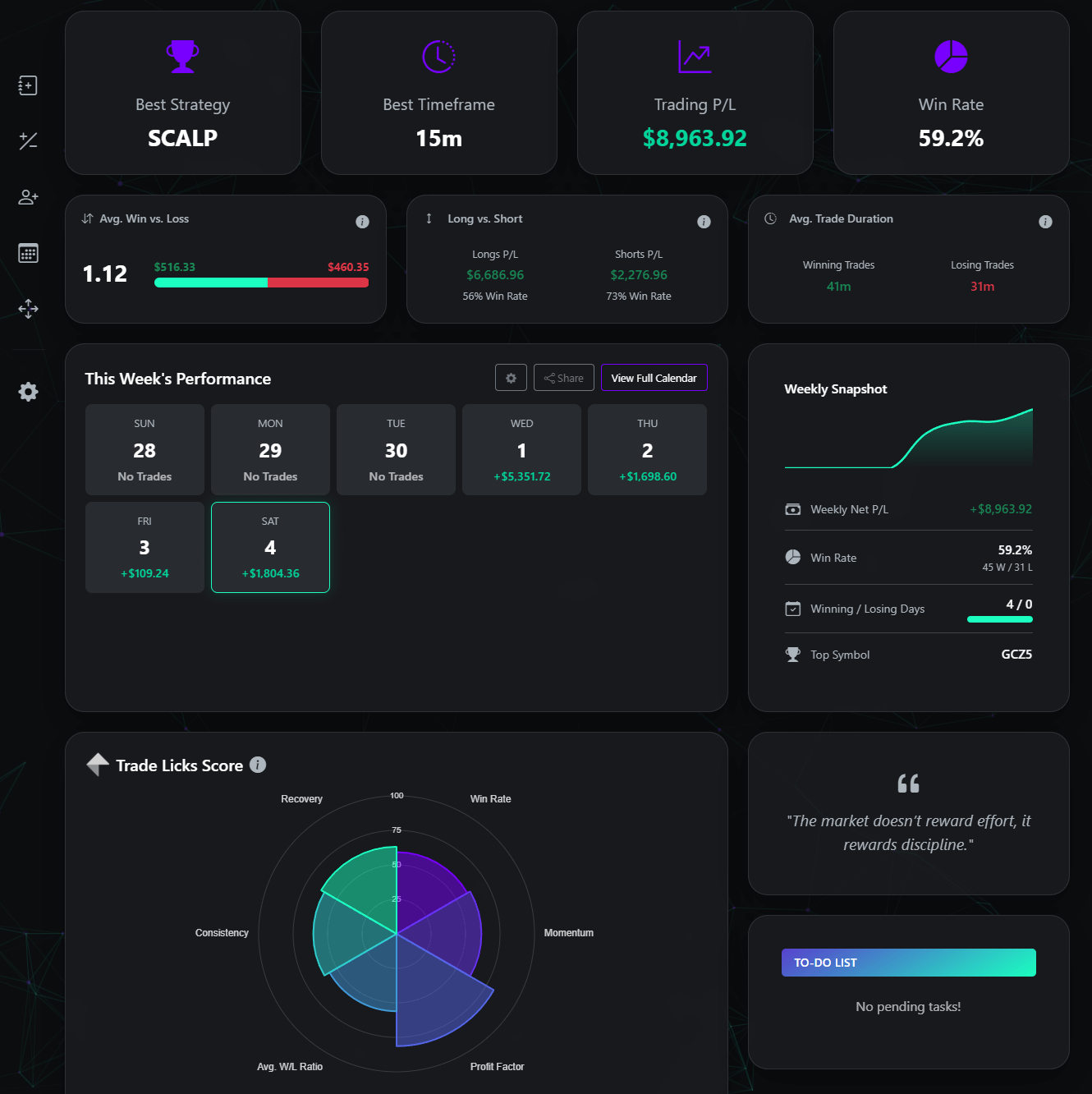
Dashboard Upgraded: The Trade Licks Score & Weekly Snapshot

A showcase of the new Dashboard Layout

Today, we're thrilled to introduce a major dashboard upgrade featuring two brand-new components: the holistic Trade Licks Score and the immediate Weekly Snapshot!

Meet Your New Performance Hub

The Trade Licks Score is more than just a chart; it's a dynamic visualization of your unique trading profile. Located prominently on your home dashboard, this new Polar Area chart distills your entire performance across six critical metrics into a single, easy-to-understand score. It helps you instantly identify areas of strength and opportunities for improvement.
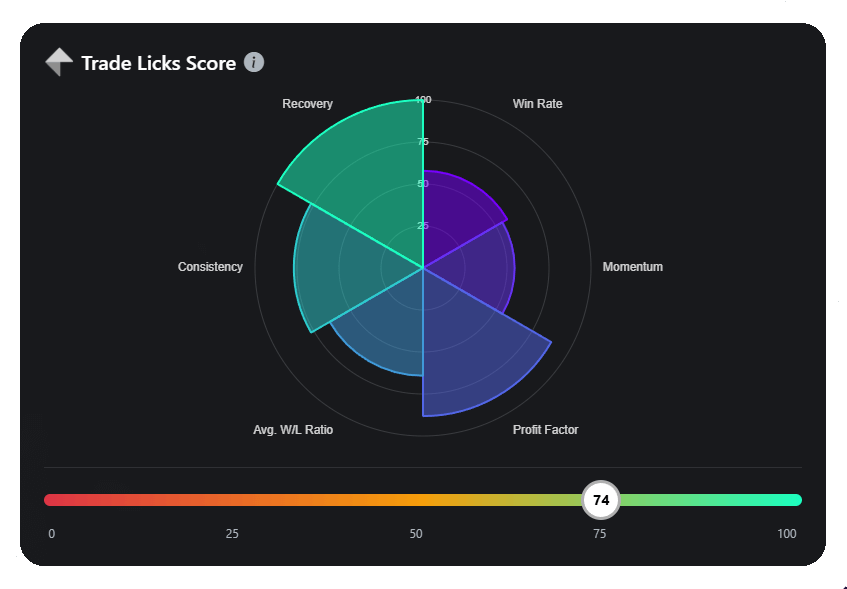
A showcase of the new Trade Licks Score Polar Area chart on the dashboard

What Do The Scores Mean?

Your overall score is an average of your performance in these six key areas of trading:

  • Win Rate: The classic metric. This score reflects the percentage of your trades that are winners.
  • Momentum: Are you on a hot streak? This score is calculated from your longest winning and losing streaks to gauge your current consistency.
  • Profit Factor: A crucial measure of profitability. It's your gross profit divided by your gross loss. A score above 1.0 indicates a profitable system.
  • Avg. W/L Ratio: This shows if your winning trades are significantly larger than your losing trades, a hallmark of disciplined trading.
  • Consistency: How well do you manage risk? This score is derived from your maximum drawdown, rewarding traders who protect their capital effectively.
  • Recovery: This measures how efficiently you make back money after a drawdown, showing the resilience of your trading strategy.

Your Week at a Glance: The New Snapshot

Alongside the Trade Licks Score, you'll now find the Weekly Snapshot card. This new component is designed to give you an immediate, data-rich summary of your current week's trading activity, helping you stay on top of your performance as it happens.
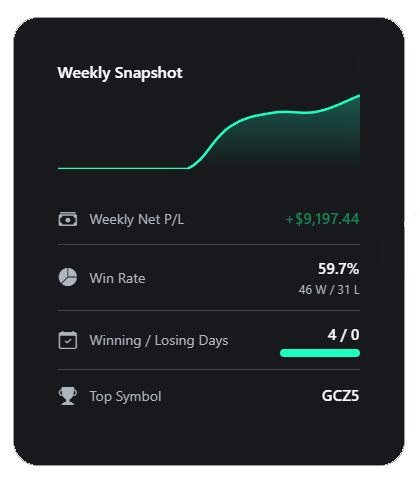
A showcase of the new Weekly Snapshot card with its P/L sparkline chart and detailed stats

It's packed with key insights, including:

  • Weekly P/L Chart: Visualize the momentum of your weekly profit and loss with a dynamic chart that shows your equity curve for the last 7 days.
  • Key Performance Indicators: Instantly see your total Net P/L, Win Rate with a Win/Loss breakdown, and your best-performing symbol for the week.
  • Winning vs. Losing Days: A simple bar visualizes the ratio of your profitable days against unprofitable ones, offering a quick look at your weekly consistency.

These powerful new additions are live on your dashboard right now. We built them for you, and we can't wait to see how these tools help you sharpen your skills and find your edge even faster. Happy trading!

September 22, 2025
Analytics Redesigned & Generic Import File Support Added

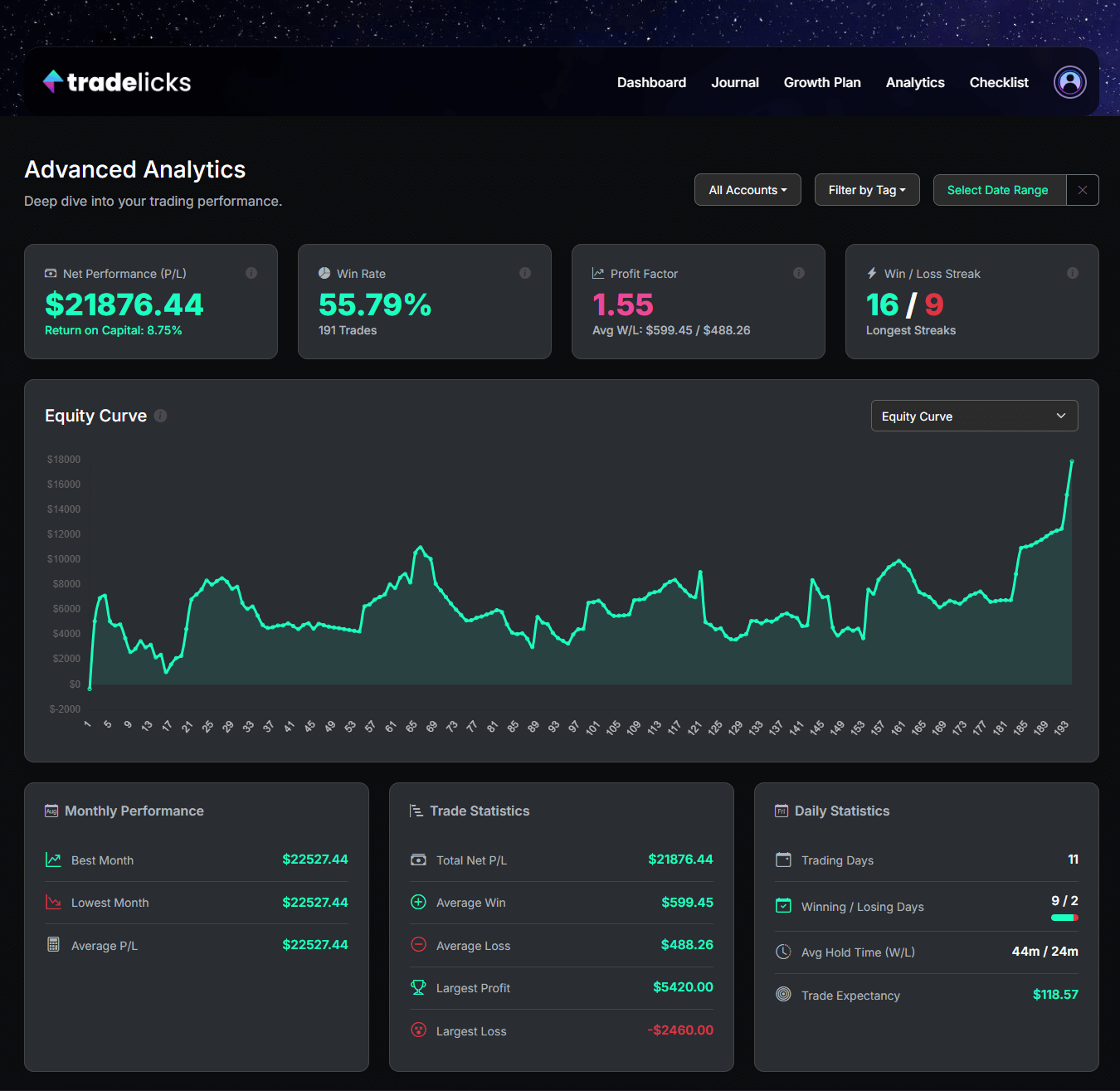
A showcase of the redesigned advanced analytics page with new stat cards

We're excited to announce a suite of powerful updates designed to make your trade analysis more insightful and your data entry more flexible. This release includes a major refinement of the Advanced Analytics page, direct Fee Tracking for trades, and our brand-new Generic CSV Importer!

A Refined & More Powerful Analytics Dashboard

We've refined the Advanced Analytics page to help you more quickly see what's working and what's not. The dashboard has been enhanced with new, powerful stats to give you an even deeper understanding of your performance.
  • New Win/Loss Streak KPI: We've added a new high-level KPI card to the top of the dashboard, allowing you to track your longest winning and losing streaks at a glance.
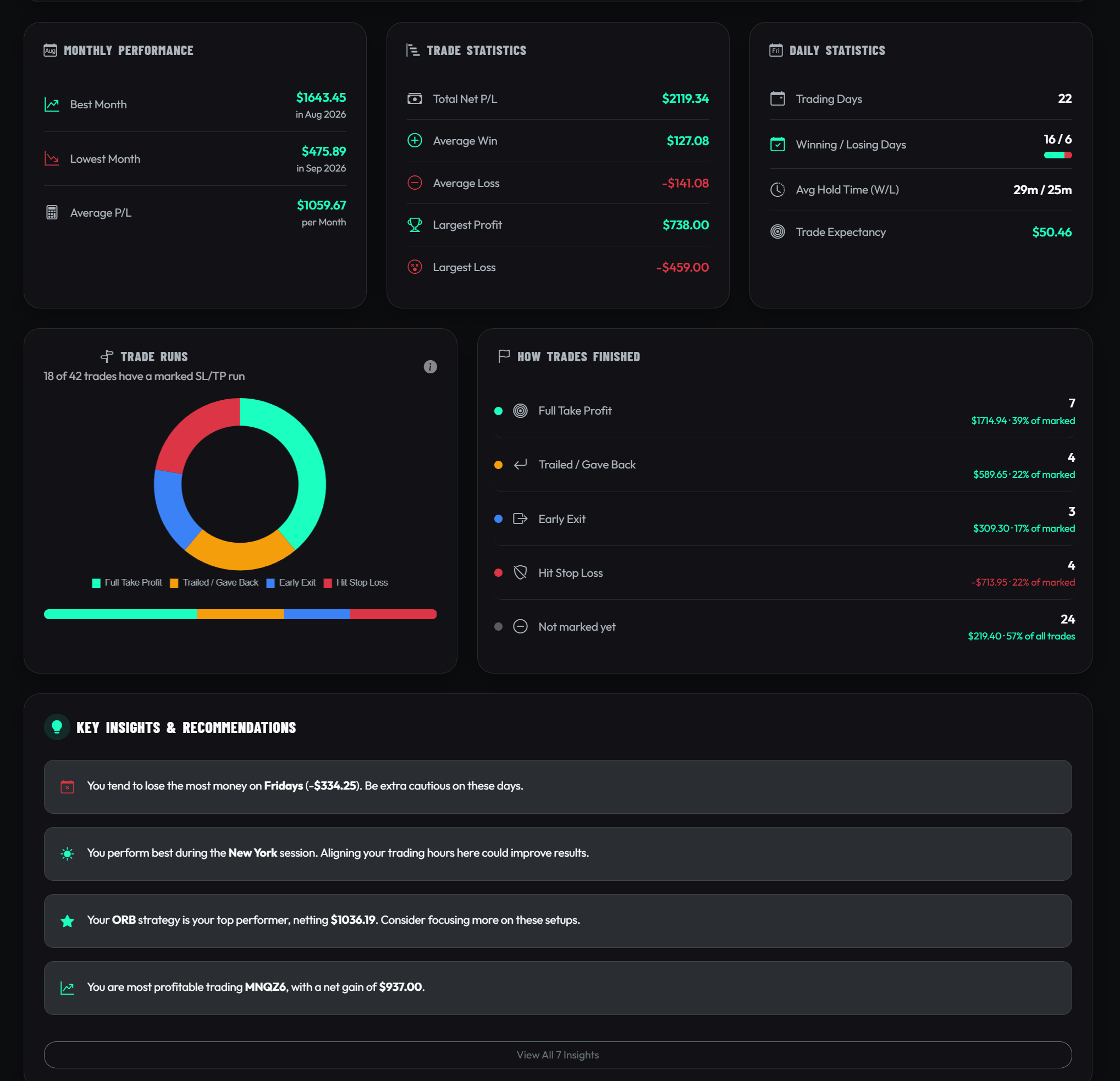
  • Brand-New Statistical Breakdowns: Dive deeper into your performance with a brand-new section of three modern, icon-driven cards for your Monthly, Trade, and Daily statistics, complete with a visualization for winning vs. losing days.
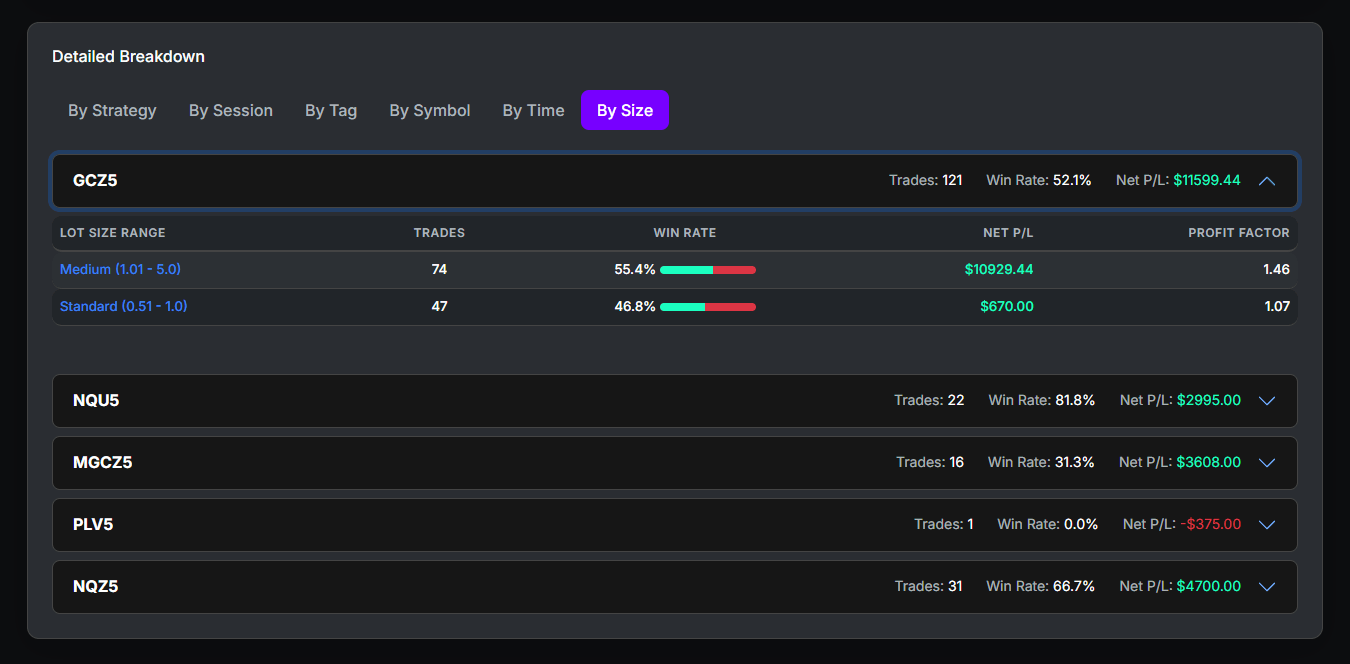
  • Improved 'By Size' Analysis: The 'By Size' breakdown in the detailed tables has been enhanced. It now groups your performance by symbol, giving you a much clearer view of how your position sizing impacts results across different assets.

A showcase of the improved By Size analytics breakdown

More Flexible Data Entry: Fees & Generic Imports

Two major improvements have arrived to streamline how you log your trades.

  • Track Fees Directly: You can now add a dedicated "Fees" amount when adding or editing a trade. This allows for a more accurate Net P/L calculation on each entry without needing to log separate adjustments.
  • New Generic CSV Importer: Is your broker or platform not on our list of supported importers? No problem! You can now download our universal "Generic CSV" template, fill it with your trade data, and upload it directly to your journal. This unlocks the power of TradeLicks for virtually any platform.

Learn more about how to use the Generic CSV Importer...


These upgrades are all about giving you a clearer, faster, and more flexible journaling experience. We hope these tools help you find your edge and take your trading analysis to the next level!

September 20, 2025
Follow Us & Share Securely: Instagram Launch + New Privacy Mode!

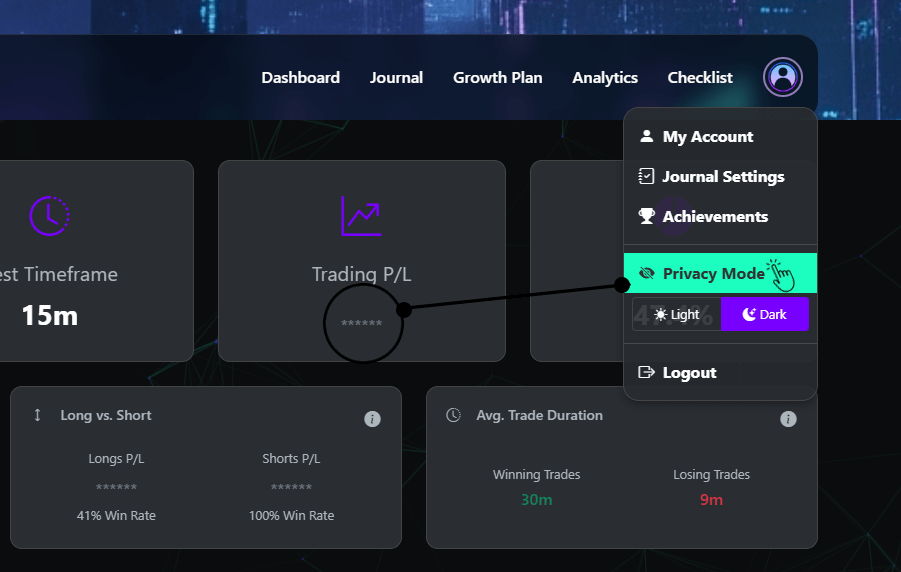
A showcase of the new TradeLicks Instagram page and the Privacy Mode feature

We're excited to announce two major updates to help you connect with the community and share your trading journey more securely than ever before. First, we're officially on Instagram! And on the subject of sharing, we've launched a powerful new Privacy Mode for our Premium users.

Join the Trade Licks Community on Instagram!

You can now follow us for trading insights, platform tips, user spotlights, and more. We're building a community of disciplined traders, and we want you to be a part of it.

  • Tips: Get insights on trading psychology and discipline.
  • Feature Spotlights: Discover how to get the most out of your journal.
  • Community Content: See how other traders are using Trade Licks to master their edge.

Follow @tradelicks on Instagram


Introducing Privacy Mode: Share Your Journey, Protect Your Data

For traders who create content, stream live, or share their screens with mentors, showing sensitive account data can be a challenge. Our new Privacy Mode, an exclusive feature for Premium members, solves this problem.

  • Activate Instantly: Toggle Privacy Mode directly from your profile dropdown menu in the header.
  • Granular Control: Choose exactly what you want to hide. The settings modal allows you to obscure all dollar values, just your account balances, or only your P/L figures.
  • Stream with Confidence: All selected values are replaced with '******' across the entire platform, allowing you to showcase your journal without revealing sensitive financial information.

Learn more about how to use Privacy Mode...


We're dedicated to building the tools you need to succeed. Follow our new Instagram for inspiration, and explore the new Privacy Mode to share your progress with peace of mind. Happy trading!

September 18, 2025
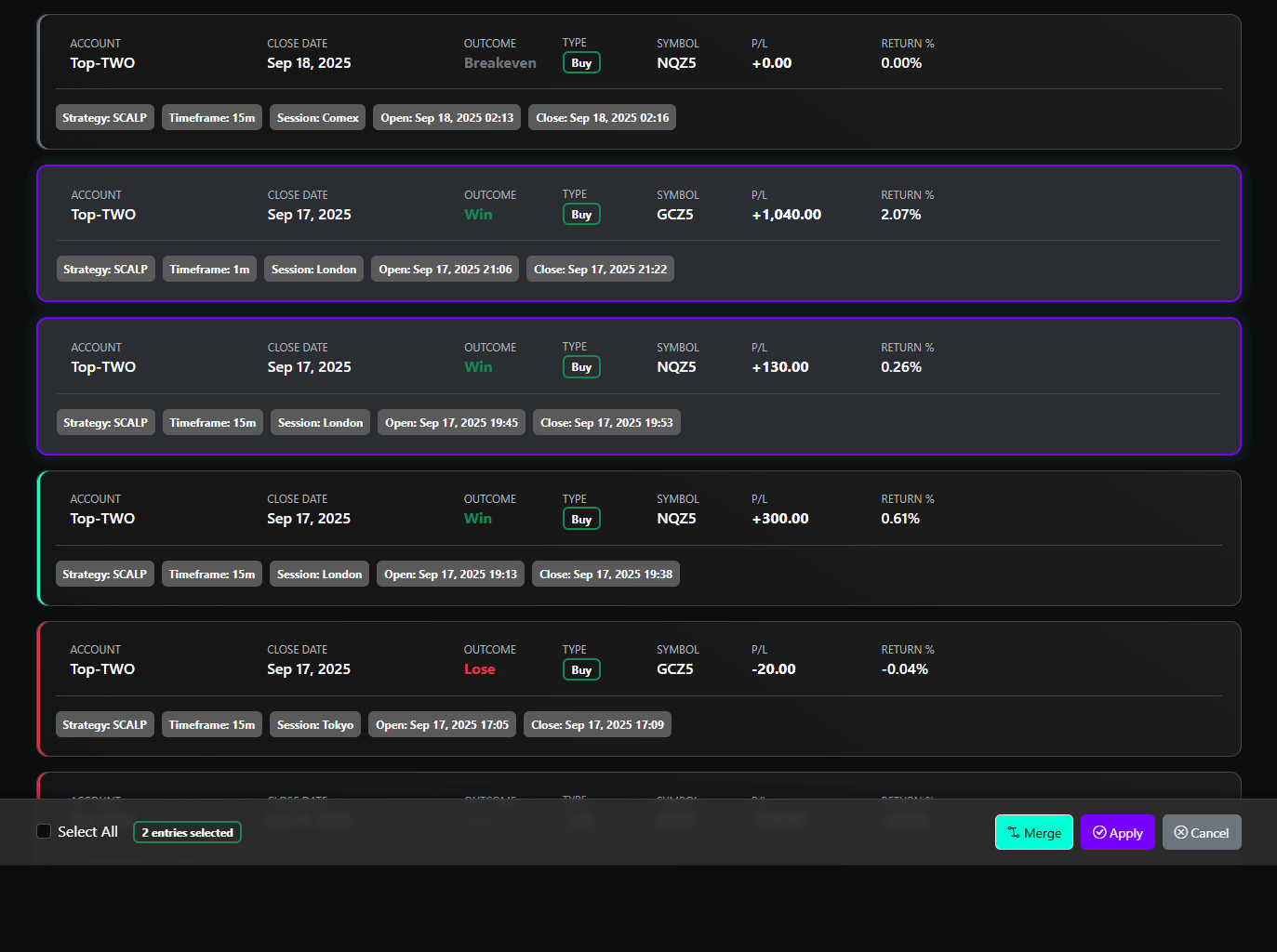
Clean Up Your Journal: Introducing Trade Merging!

A showcase of the new trade merge feature in action

We're thrilled to introduce a powerful new tool designed to help you organize your journal and gain a clearer, more accurate view of your trading performance: Trade Merging. This feature is perfect for traders who scale in and out of positions or want to consolidate related entries into a single, comprehensive record.

What is Trade Merging?

Trade Merging allows you to select multiple trade entries and combine them into one. This is especially useful for:

  • Scaling In & Out: If you add to or reduce your position size during a trade, you can now merge all related entries to see the overall performance of your single trade idea.
  • Partial Take Profits: Consolidate multiple take-profit exits to accurately reflect the total P/L, duration, and return of the entire trade from start to finish.
  • Cleaning Up Your Journal: Easily combine accidental duplicate entries or other trades that belong together to keep your records tidy and precise.

How It Works: A Smarter Way to Combine

Merging is simple and intuitive, designed to give you full control over the final result.

  • Activate and Select: From the journal page, enter Bulk Edit mode, select two or more trades, and the new "Merge" button will appear in the action bar.
  • Intelligent Conflict Resolution: The system automatically calculates new combined values for you (summing P/L, using the earliest open and latest close times). If there are any conflicts—like different strategies or symbols—a modal will pop up allowing you to choose the final value for the merged trade.
  • Safe and Secure: To prevent accidents, you must type "MERGE" to confirm the action. The new merged trade will also retain all unique Broker IDs from the original entries to prevent duplicate imports in the future.

Learn more about how to use the Merge feature...


This new feature is designed to give you a more accurate and organized view of your trading history, especially for more complex trading styles. We can't wait for you to try it out!

September 14, 2025
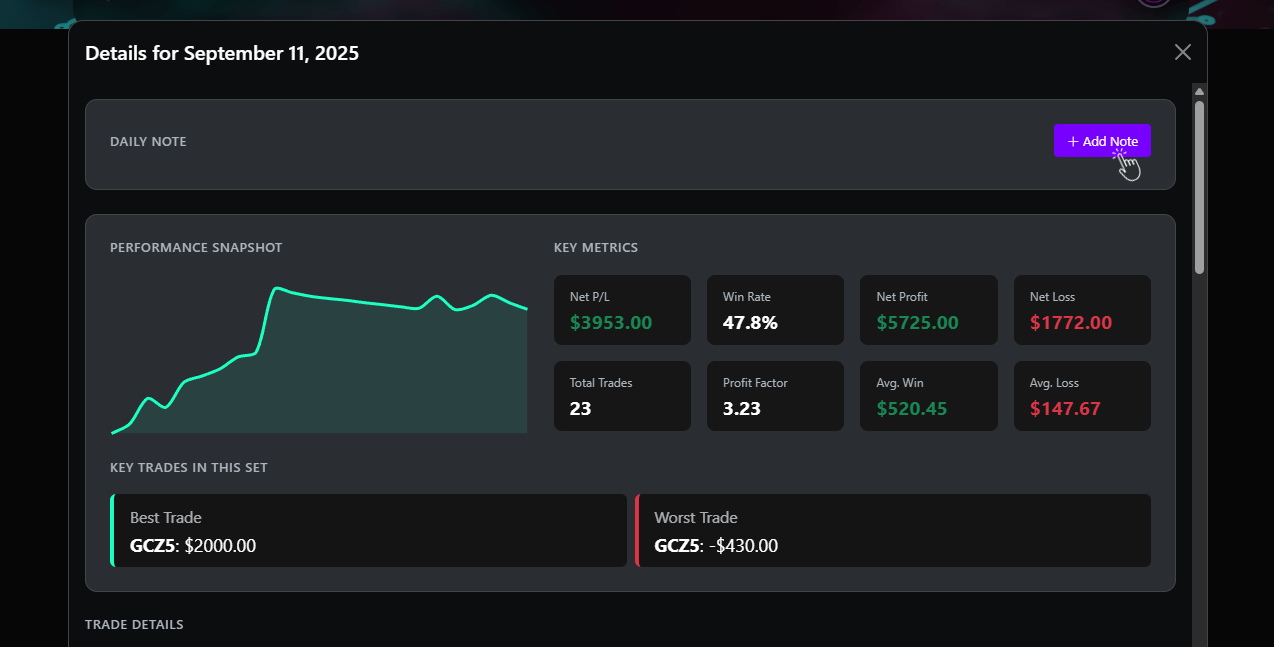
Journaling Upgraded: Interactive Analytics, Daily Notes, Tag Favourites & Workflow Automation!

A showcase of the new interactive analytics and daily notes features

We're excited to announce a major update, building upon our powerful journaling platform to bring you even more ways to connect your thoughts to your trades, supercharge your analysis, and streamline your workflow.

Connect Your Mindset to Your Metrics

Your journal is more than just numbers; it's the story of your decisions. We've introduced powerful new ways to capture the "why" behind your trades and see it reflected directly in your performance data.

  • Introducing Daily Notes: You can now add notes to any day directly from your Home Dashboard or the main Calendar page. Jot down market sentiment, your psychological state, or news events to build a richer trading diary.
    Learn more about Daily Notes...
  • The Magic of Connection: Your Daily Notes and individual Trade Notes are now fully integrated into the Advanced Analytics page. When viewing the "Detailed Breakdown by Tag," you'll see an icon next to any tag that has associated notes. Click it to see every related thought and observation—both daily and trade-specific—right next to the hard data.
    Learn how to connect your notes to data...

Advanced Analytics: Now Fully Interactive

We've transformed the Advanced Analytics page from a static report into a dynamic research tool.
Learn more about using Drill-Downs...

  • Click Everything: Ever wondered which trades made up your stats for a specific strategy? Now you can find out. Every row in the detailed breakdown tables is now clickable. Click on a Strategy, Symbol, Tag, Session, or Time of Day to instantly open a modal showing the exact trades that make up that statistic.
  • Drill Down on Any Note: While reviewing your connected notes, you'll see a subtitle like "From trade on ESZ24...". This is now a clickable link! Click it to instantly open a drill-down modal showing the details of that specific trade.
  • Richer Data in Every Click: To give you a clearer picture, the drill-down modal has been enhanced with Net Profit (Gross Profit) and Net Loss (Gross Loss) metrics, helping you better understand the magnitude of your wins and losses.

A Faster, Smarter Workflow

We've also added two new features designed to streamline your journaling process and save you valuable time.
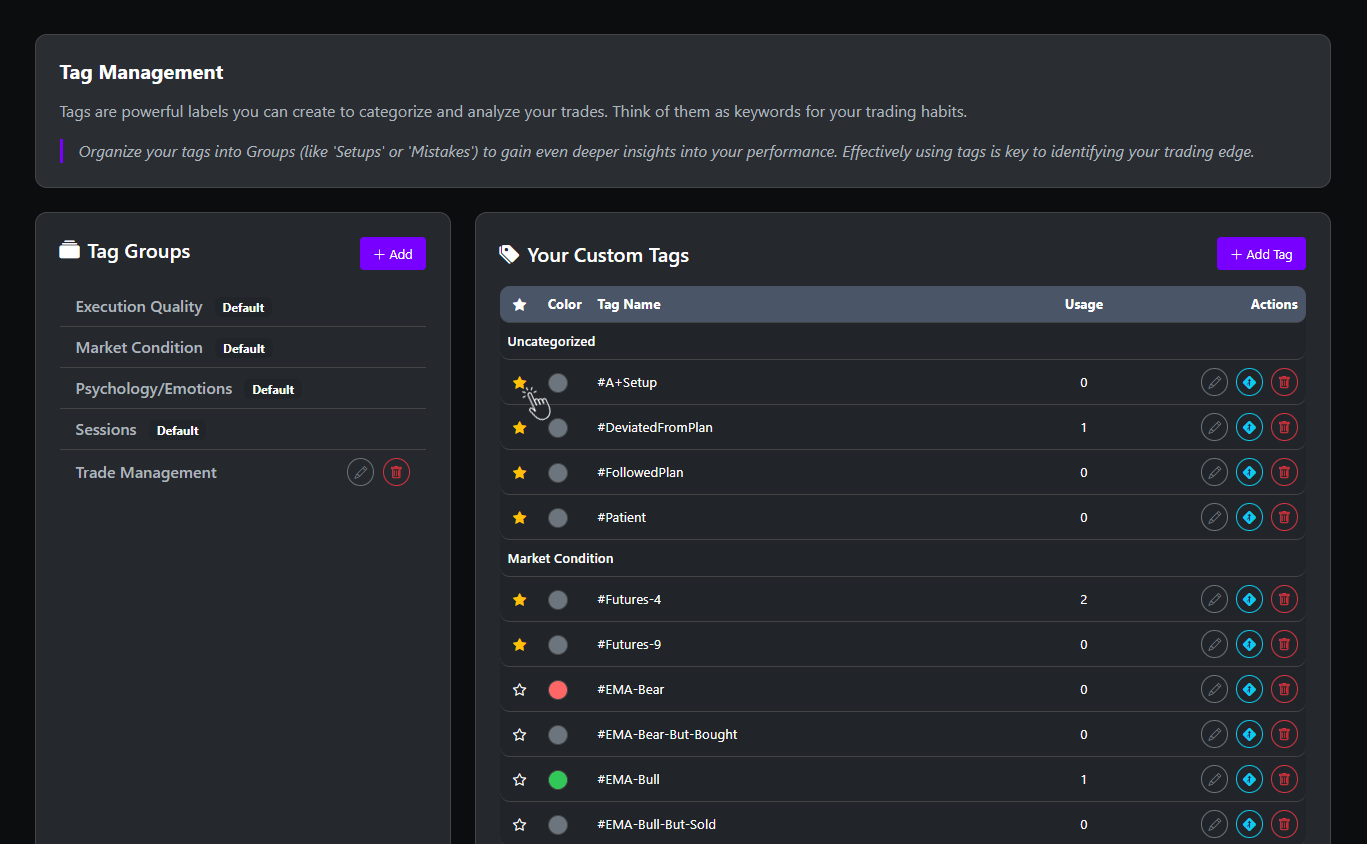
A demonstration of the new Favorite Tags feature
  • Favorite Tags: Tired of scrolling to find your most-used tags? Head to the Tag Management page and click the new star icon to favorite any tag. Your "favorites" will now appear in their own section at the top of the tag selector for instant access when logging trades.
    Learn more about Favoriting Tags...
  • Default Import Settings: For traders who import from CSV, you can now set a default Strategy and Timeframe. On the Import Trades page, use the settings cog to define your defaults. Any imported trade without this information will now be automatically assigned, saving you significant manual effort.
    Learn more about Default Import Settings...

These new features are all about providing deeper connections between your actions, your thoughts, and your results. We're committed to continuously building upon the platform to give you the best tools to refine your edge. Dive in and explore!

September 11, 2025
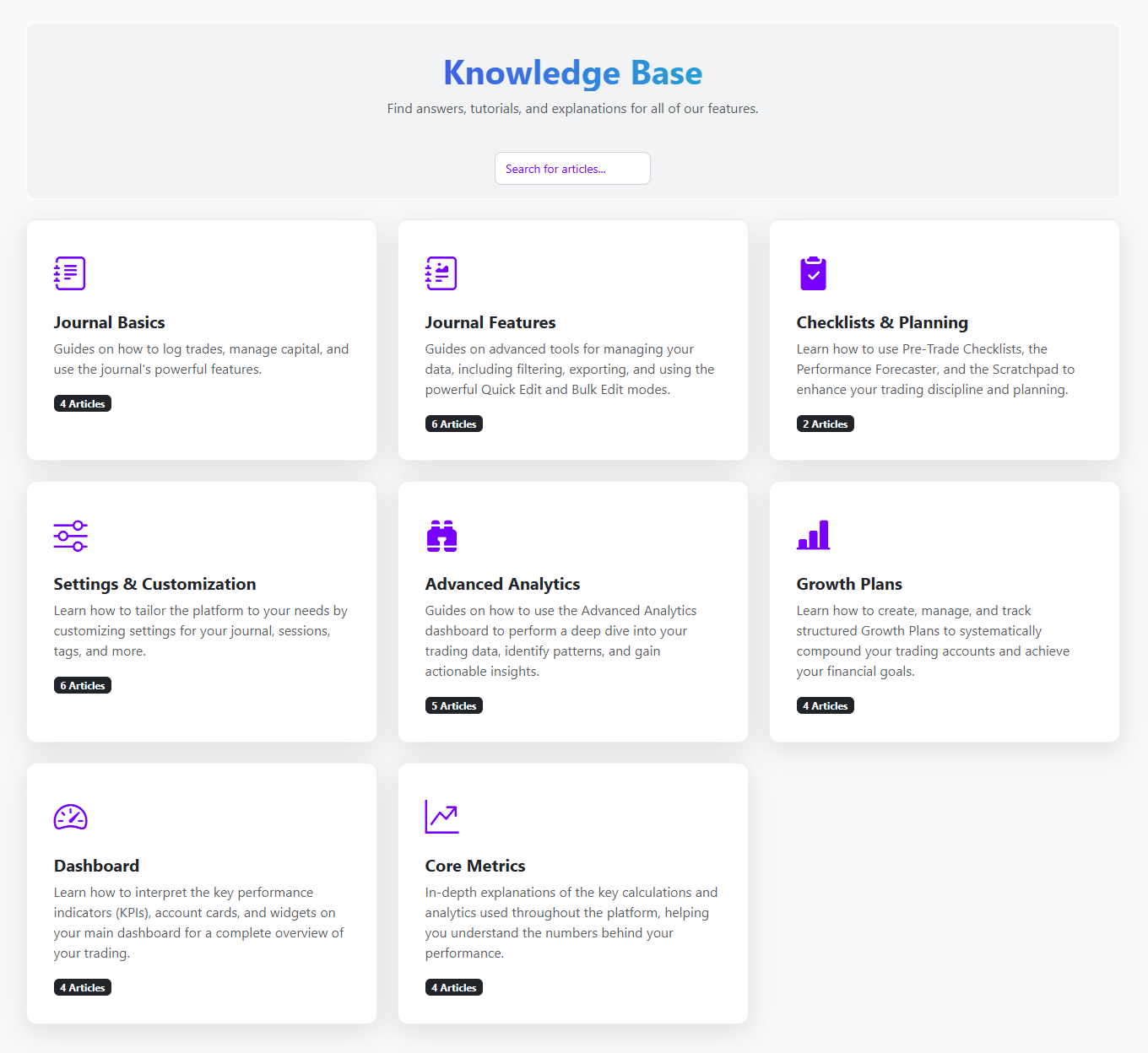
Your Guide to Mastery: The Knowledge Base is Here!

A showcase of the new Knowledge Base page on desktop and mobile

We are thrilled to announce the launch of the brand new Trade Licks Knowledge Base! This has been a massive undertaking to provide you with a comprehensive, centralized hub for clear, detailed guides on every feature our platform has to offer.

Find Answers Fast

Our new help center is designed to be your first stop for any questions. You'll find step-by-step instructions, deep dives into core concepts, and helpful tips to accelerate your learning curve.

In-Depth Guides for Every Feature

We've meticulously documented the entire platform, including our most powerful tools. Some of the new guides include:

  • Advanced Analytics: Learn how to interpret every KPI, use the interactive charts, and master the drilldown feature to find your edge.
  • Growth Plans: Get a full walkthrough on creating plans, tracking your progress, and using the new "Test Mode" to simulate your path to success.
  • Journal Features: Discover guides on everything from importing trades and using filters to mastering the powerful Quick Edit and Bulk Edit modes.
  • Settings & Customization: Learn how to personalize your profile, manage your tags and sessions, and tailor the platform to your unique workflow.

A Living Resource

The Knowledge Base is a living project. We will be constantly updating it with new articles and improving existing ones as we release new features. If there's something you'd like to see covered, don't hesitate to let us know!


Our goal is to empower you with the knowledge to use every part of Trade Licks to its full potential. Explore the new Knowledge Base today and take your journaling to the next level!

September 7, 2025

Performance Unleashed: Revamped Calendar & Shareable Stats!

We're thrilled to roll out another update focused on giving you a clearer, more professional way to track and share your trading performance. This release introduces a completely revamped Performance Calendar and powerful upgrades to how you export your stats, helping you analyze your progress and celebrate your wins like never before.

The All-New Performance Calendar

Your calendar is no longer just a log of trading days—it's now a powerful performance dashboard. We've redesigned it to give you an instant, data-rich overview of your consistency and profitability.

  • Weekly Totals at a Glance: Each week now concludes with an automated summary, calculating your total net P/L for that period. Instantly see if you ended the week in profit or loss.
  • Live Monthly P/L: A new header dynamically tracks your total profit and loss for the entire month as you navigate, giving you a constant high-level view of your performance.
  • Streamlined Navigation: The interface is now faster and cleaner, allowing you to jump between months and accounts with seamless loading—no more page reloads.

Pro Tip: Don't forget, you can click on any trading day in the calendar for an in-depth breakdown of the trades that contributed to that day's performance!


The refined and improved calendar showing new weekly and monthly totals

Upgraded: Share Your Performance in Style

The ability to export your performance as a PNG isn't new, but we've completely rebuilt the experience. Instead of a direct save, you now have a powerful and flexible sharing interface with new options and locations.
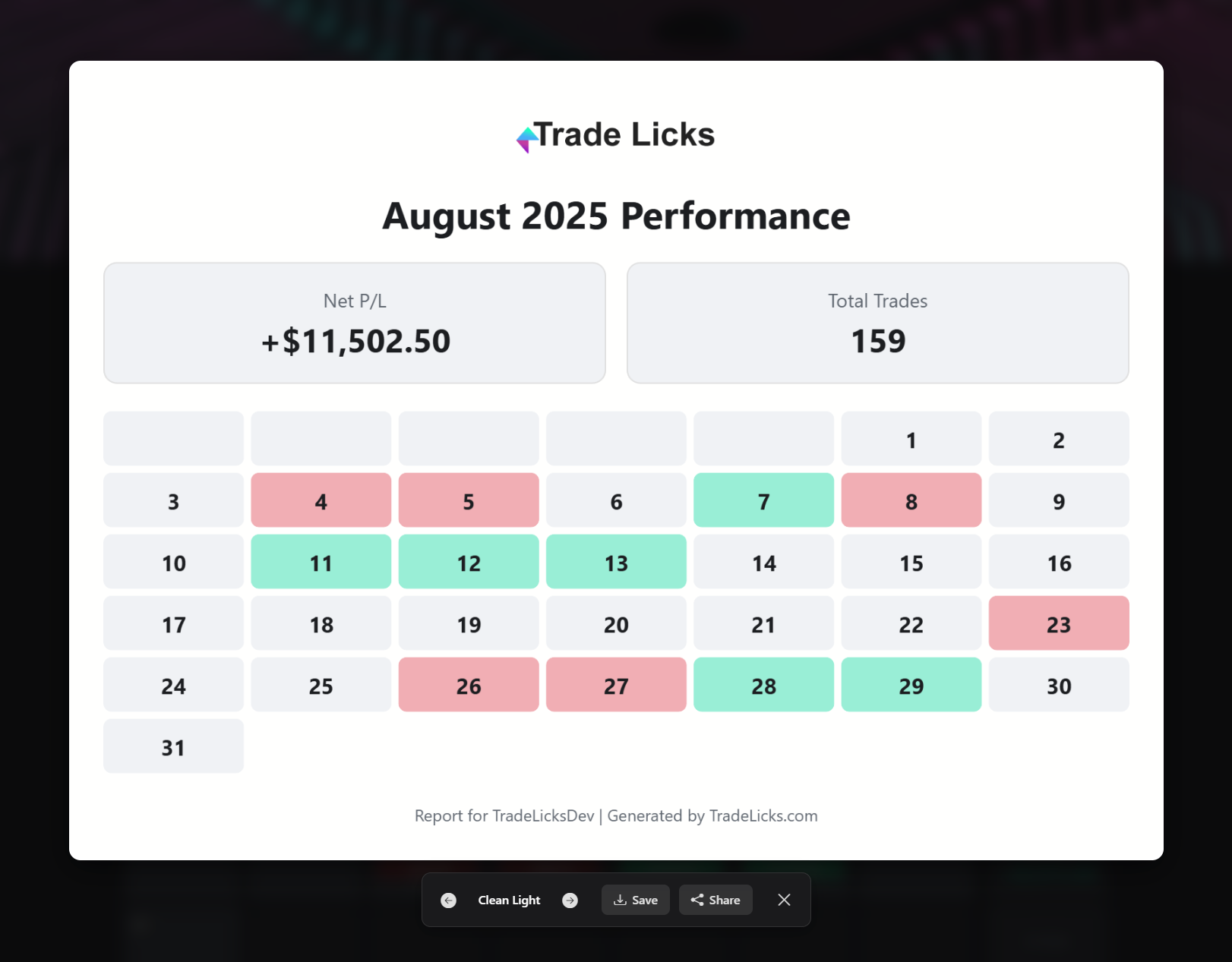
  • New Theming Engine: The biggest upgrade! You can now cycle through multiple professional themes for your performance cards, finding the perfect look before you save or share.
  • Share Anywhere: Beyond just saving, use your device's native share functionality to send your performance card directly to social media or messaging apps.
  • All-New Calendar Export: The new Calendar page now features its own export option, allowing you to share your full monthly performance grid for the first time.
  • Upgraded Everywhere: The new sharing modal and theming options are now available on the Dashboard (for this week's stats) and the Journal (for custom/all-time stats), replacing the previous direct-save function.

The new sharing display with theme options for exporting performance summaries

These updates are designed to help you better understand your trading patterns and proudly share your journey. Jump into your account now to explore the new Calendar and try out the new sharing features!

August 31, 2025
Platform Overhaul: Introducing Visual Analysis, New Achievements & More!

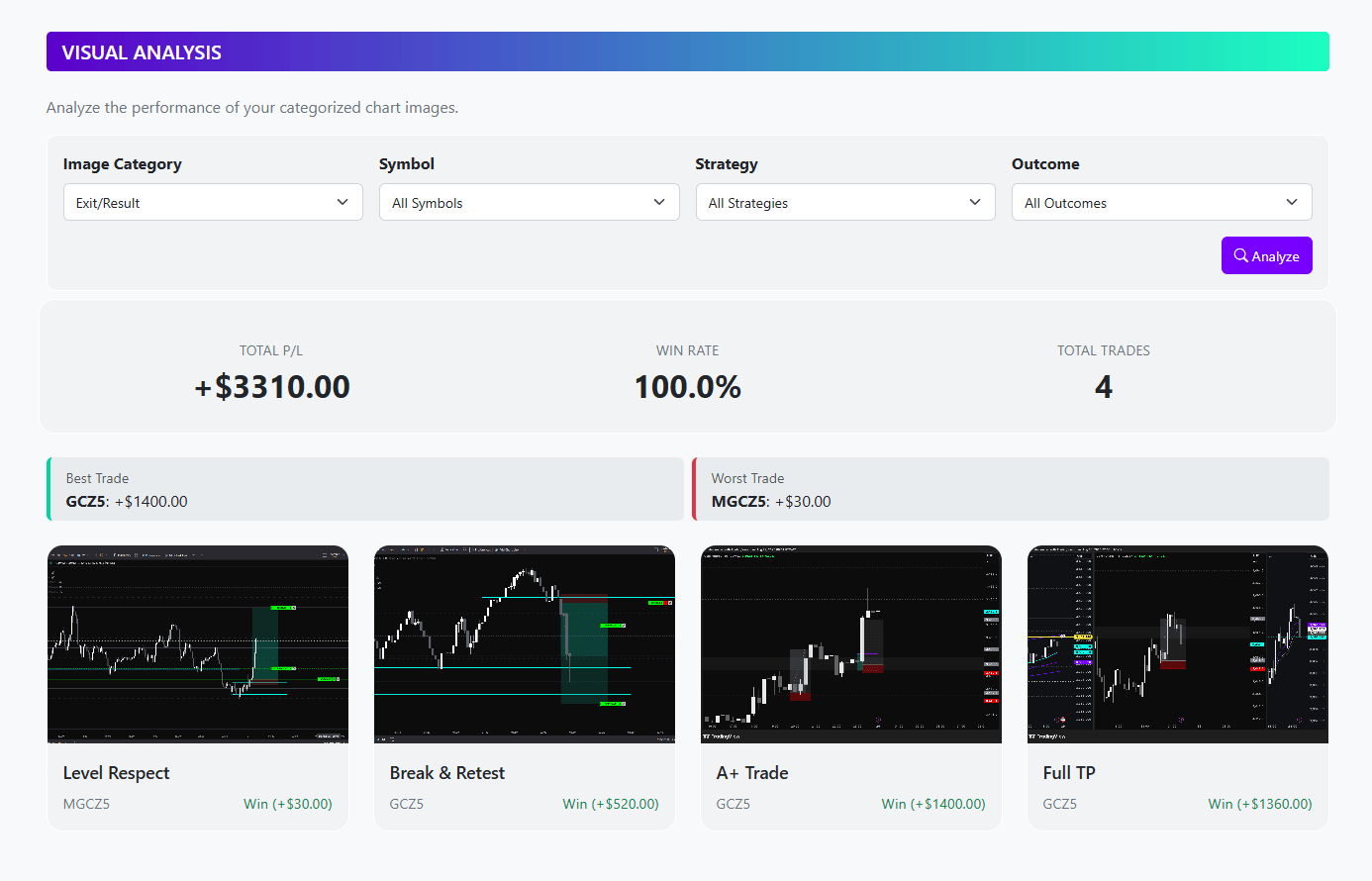
A showcase of the new Visual Analysis page and expanded achievements

We're excited to announce a massive upgrade to the Trade Licks platform, built on one of your most requested features: multi-image uploads. This new foundation allows you to tell the complete visual story of every trade, and it powers an entirely new way to analyze your performance.

A Richer, More Flexible Journal

We've overhauled image handling to give you the flexibility and power to document every angle of your trading.

  • Tell the Full Story: Upload up to four images per trade. Show the pre-trade setup, the entry, in-trade management, and the final exit, or capture multiple timeframes for a complete market overview.
  • Add Context with Captions: Each image supports an optional caption. Add your specific thoughts or analysis directly to a chart so you never forget why you made a decision.
  • Direct Uploads for Subscribers: To provide a seamless experience, Pro members get 500 MB of secure cloud storage, and Premium members get a massive 5 GB. You can track your usage with a new progress bar inside a brand new Site Statistics section under My Account, click your profile icon and check it out.
  • Image Links for Everyone: All users, including those on the Free plan, can continue to attach images by pasting links from services like TradingView.

Introducing: The Visual Analysis Engine

Uploading detailed images is just the beginning. We've built a brand-new Visual Analysis page to help you turn those images into actionable insights.

  • Categorize Every Edge: Assign a category like "Pre-Trade Setup," "Entry Trigger," or "Exit/Result" to each image you upload.
  • Find Your Winning Patterns: Instantly view a gallery of every "Entry Trigger" or "Trade Management" image you've ever logged, allowing you to visually compare your best (and worst) setups side-by-side.
  • Data-Driven Insights: The analysis page includes a dynamic stats panel that calculates the real-time P/L and Win Rate for the exact set of images you are viewing. Discover which of your visual patterns are actually profitable.

Note for Existing Users: To take full advantage of this new feature with your past trades, you'll need to edit any existing journal entries that have images attached. Simply open the entry, and you'll see a new option to assign a category (like "Pre-Trade Setup" or "Entry Trigger") to each image. This one-time update will allow the Visual Analysis engine to include your entire visual history in its calculations!


Level Up: The Achievement System Reimagined

To guide you on your journey and reward good habits, we've more than doubled the number of achievements you can earn.

  • Full Progression Paths: Every category now has a full set of tiers—Bronze, Silver, Gold, and Diamond—creating a clear path to mastery.
  • Rewarding Good Habits: Earn new achievements for creating Growth Plans, using stop losses consistently, writing detailed notes, and much more. It's not just about profit, it's about process.

We're proud to bring you this major update, focused on providing professional-grade tools for visual review and performance analysis. You can find the new Visual Analysis page in the action bar on your Journal page, right next to the 'Calendar' button. Be sure to also check your Achievements page to see all the new goals and track your progress!

August 25, 2025
Growth Plan Update: Introducing the All-New Growth Plan

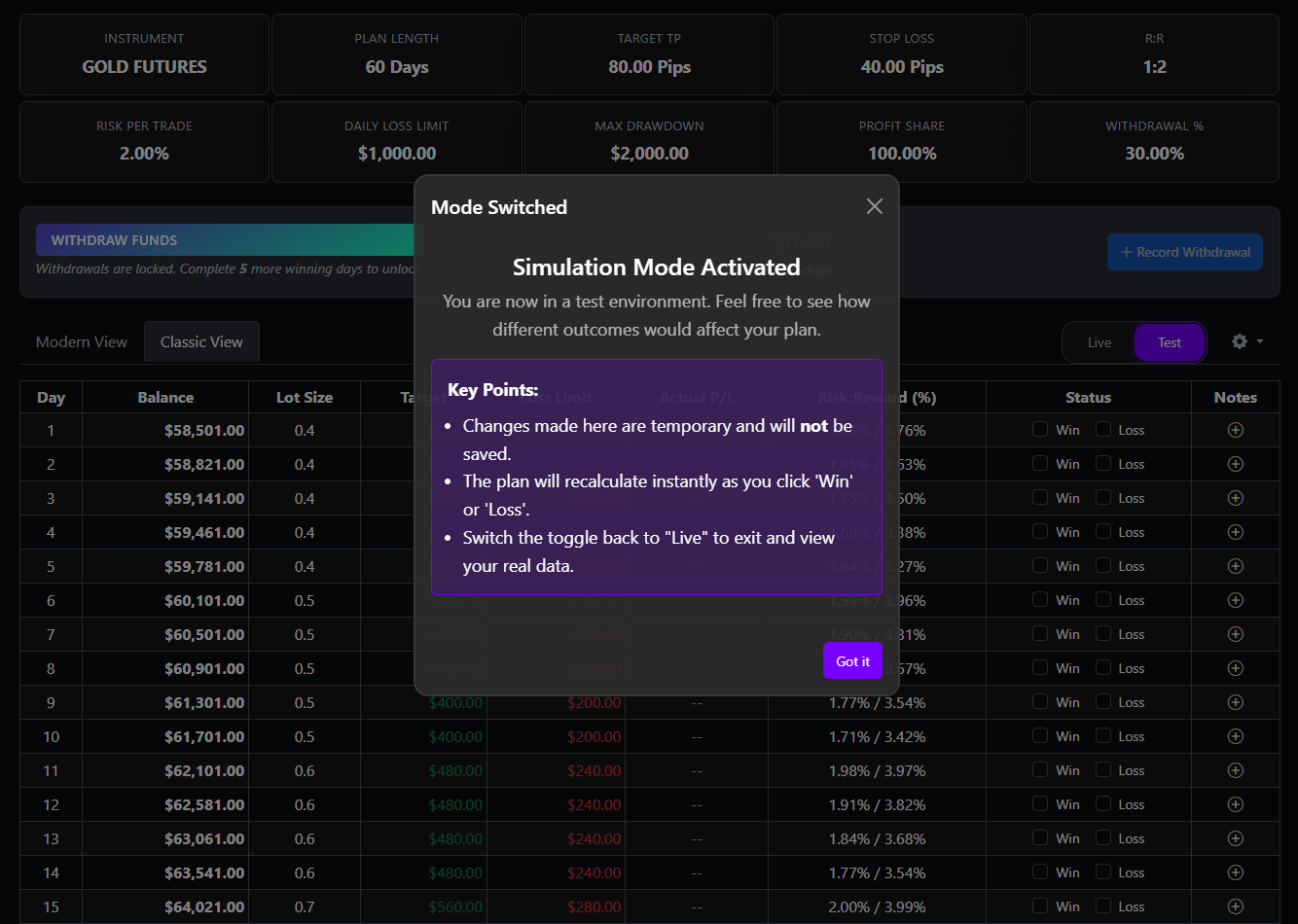
A showcase of the new, redesigned Growth Plan interface

We've completely rebuilt the Growth Plan feature from the ground up. This major upgrade isn't just a facelift; it's a comprehensive overhaul designed to make this tool more powerful, accurate, and intuitive than ever before. Welcome to a smarter way to plan your success.

New Feature: Simulation Mode

Ever wonder "what if?" Now you can find out. Test mode has been added, allowing you to plan for any scenario.

  • Plan for Success: Toggle into the new "Test Mode" to safely simulate how a series of wins and losses would impact your plan's projections.
  • Risk-Free Exploration: All calculations are temporary and will never be saved to your journal, giving you a perfect sandbox to test your strategy's potential.

Advanced Prop Firm Support

We've overhauled our prop firm logic to give you the precision required to pass your challenges and grow your accounts.

  • Accurate Trailing Drawdown: We've implemented the industry-standard "Trailing Lock" model, which correctly calculates your available drawdown after it locks at your initial balance.
  • Flexible Rules: You can now choose the specific "Drawdown Behavior" that matches your firm's rules right from the plan settings.

Smarter, Simpler, and Faster

We've eliminated bugs and streamlined the experience based on a new, intelligent foundation.

  • Flawless Balance Calculation: The core calculation engine has been rebuilt to ensure your plan's balance and projections are always 100% accurate.
  • No More Re-Syncing: The old "Re-Sync" button is gone because it's no longer needed. The new system is smart enough to automatically recalculate and heal itself when you make changes.
  • Optimized for Speed: Under the hood, we've optimized database queries to ensure your Growth Plan loads faster than ever, even with a long trading history.

This has been one of our biggest updates yet, driven entirely by our commitment to building the best tools for traders like you. Head over to your Growth Plan to experience the difference today!

August 20, 2025
Platform Update: Introducing the All-New Light Theme

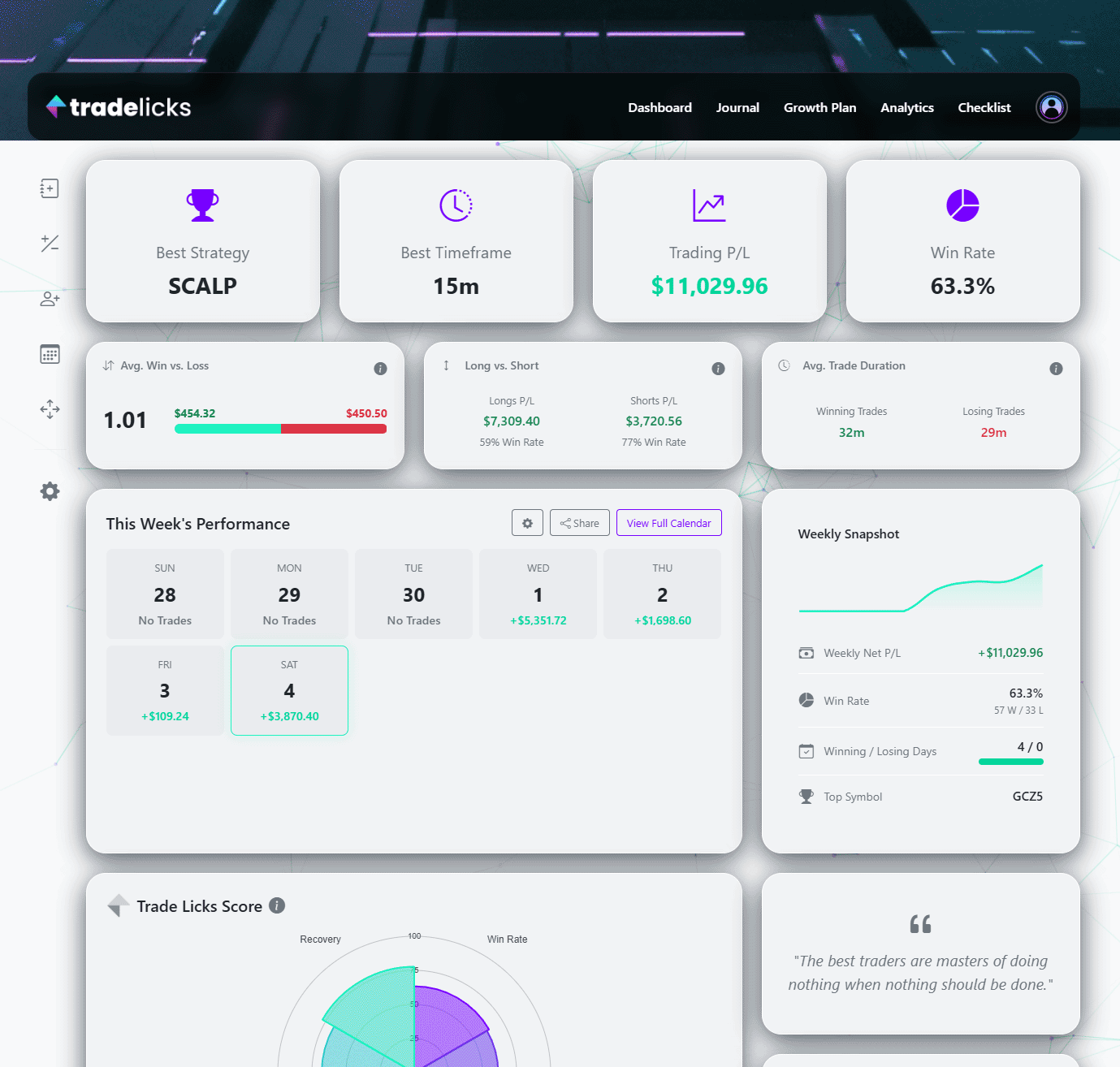
Side-by-side comparison of the new Light Theme and the original Dark Theme

By popular request, we're excited to introduce a brand new Light Theme for the entire platform. Now you can analyze your trades in a bright, high-contrast interface designed for clarity in any lighting condition.

A Bright and Clear Interface

The new Light Theme offers a clean, modern aesthetic that makes your data easy to read, whether you're journaling in a bright office or on the go.

  • Enhanced Readability: The high-contrast design with dark text on a light background is perfect for well-lit environments and reduces eye strain for many users.
  • Complete Theming: Every page has been meticulously styled, from your Journal and Dashboard to Analytics and Profile Settings, ensuring a consistent experience.
  • Seamless Switching: Instantly toggle between Light and Dark themes at any time. Your preference is automatically saved.

How to Activate Light Theme

Switching themes is simple and can be done right from your profile menu.

  • 1. Open Your Profile Menu: Click on your profile picture in the top-right corner of the header.
  • 2. Select Your Theme: In the dropdown, you'll find the new theme switcher. Simply click 'Light' or 'Dark' to apply your desired theme instantly.

We're thrilled to bring this update to you and believe it will make your journaling experience even better. Head to your profile menu to give it a try and see your trades in a new light!

August 16, 2025
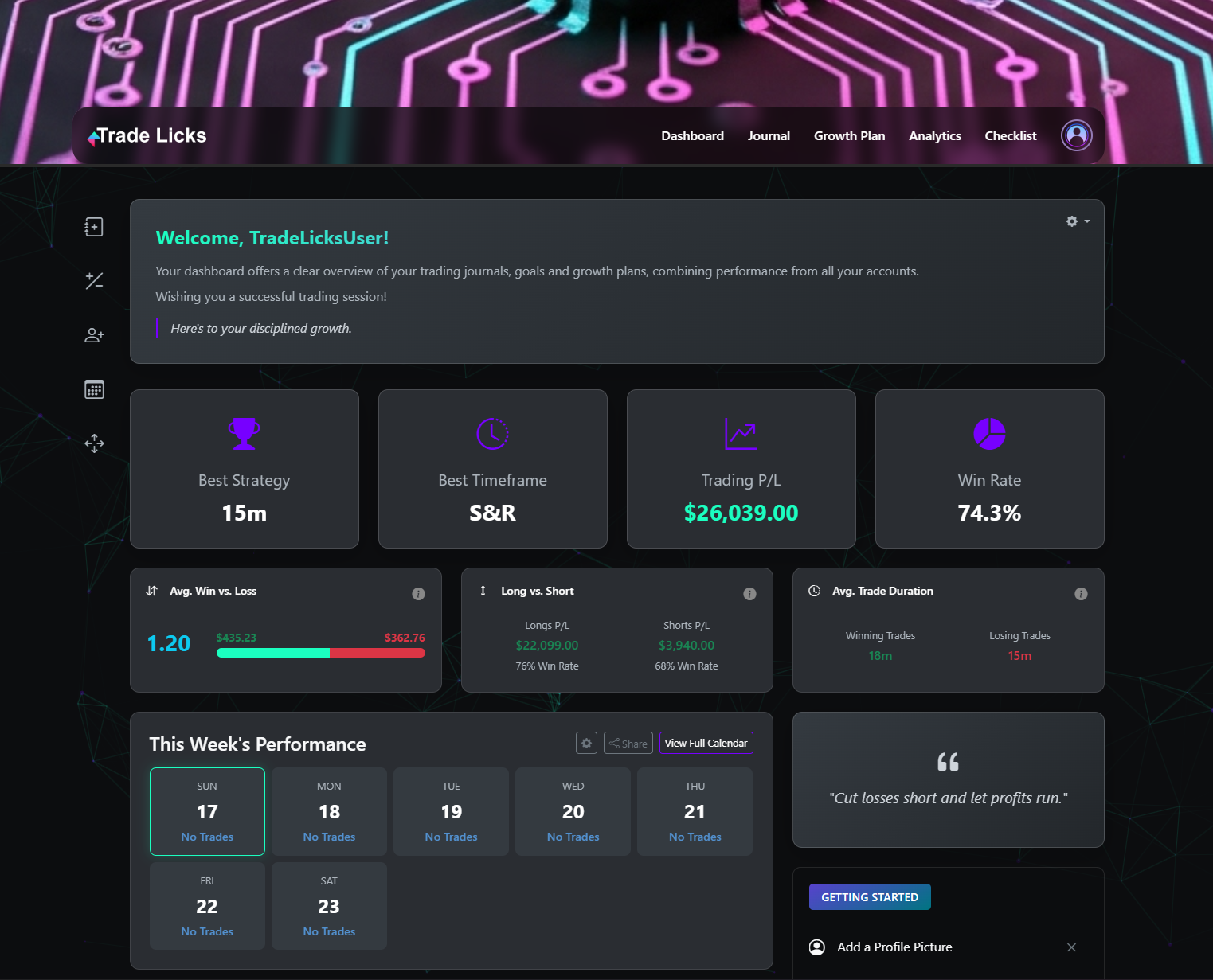
New Dashboard Features: The Quick-Access Toolbar & Advanced Stat Cards

Dashboard Toolbar and new stat cards

We've just released two new features for your dashboard designed to make your journaling faster and more insightful. Meet the new Dashboard Toolbar and three Advanced Stat Cards.

A Hub for Quick Actions

The new toolbar is always visible on your dashboard, putting your most-used actions right at your fingertips. Here’s a look:

  • Instantly Add Trades & Adjustments: Jump straight into logging a new trade or capital adjustment without leaving your dashboard.
  • Quick Navigation & Management: One-click access to add new accounts, view your calendar, or organize your account card layout.
  • Optimized for Mobile: On mobile devices, the toolbar intelligently moves to the bottom of the screen for easy access.

New Performance Metrics

Alongside the new toolbar, we've added three advanced stat cards. They go beyond simple win rates to give you a more nuanced look at your trading habits.

  • Avg. Win vs. Loss Card: Instantly see your average Risk:Reward ratio to understand if your wins are sufficiently covering your losses.
  • Long vs. Short Card: Discover if you have a directional bias by comparing your profitability and win rate for both long and short trades.
  • Avg. Trade Duration Card: See if you're cutting winners short or letting losers run with a comparison of your holding times.

These new features are designed to make your journaling experience more seamless and insightful. Head over to your main dashboard to see them in action. We're confident they will become a helpful part of your daily trading routine!

August 12, 2025

New Feature: Automatic Session Detection & Custom Sessions

Understanding when you trade is key, but manually logging the session for every entry is tedious. To help you save time and unlock deeper insights, we're thrilled to launch our new Automatic Session & Overlap Detection System!

This intelligent system works in the background to bring effortless precision to your journaling. It automatically analyzes your trade's open time to log the correct session and apply insightful tags, saving you from tedious manual selection. Your journal now works smarter, so you can focus on trading better. Here’s what’s new:


  • New Centralized Hub: Journal Settings: To streamline your workflow, we've created a new dedicated settings area.
    • You can now find a "Journal Settings" link in the main dropdown menu when you click your profile icon in the header.
    • This new hub is now the home for both Tag Management and the new Session Management features.

  • Introducing Fully Automatic Session Detection: Say goodbye to manual entry! Simply enable the new "Automatic Session Detection" feature in the Session Management hub, and the platform will instantly identify which trading session your trade was opened in.
    • Intelligent & Accurate: The system knows the real-time market hours for all major sessions (New York, London, Tokyo, Sydney) and automatically adjusts for Daylight Saving Time changes around the world, so your data is always precise.
    • Set It and Forget It: Once enabled, every trade you log—manually or via import—will be assigned the correct session. No more guesswork.

  • Market Overlap Analysis: For the first time, you can automatically identify trades executed during the most liquid and volatile periods—when major market sessions overlap.
    • When a trade falls within two or more major sessions (like the crucial London/New York window), the system will automatically apply a special tag, such as #London-NewYork-Overlap.
    • These automatically generated tags will appear in your "Your Custom Tags" table under the "Session Overlaps" group, ready for you to analyze.

  • Total Control with Custom Sessions: Your strategy isn't limited to standard hours, and now, neither is your journal. The new Session Management Hub gives you full control.
    • Create Your Own Windows: Easily define your own specific trading periods, like "Pre-NY Volatility" or "Asia Range Scalping," complete with custom start times, end times, and timezones.
    • Seamless Integration: Your custom sessions are automatically included in the detection engine and will be prioritized when assigning a session to your trades.
    • One-Click Control: Enable or disable the entire auto-detection system with a single toggle to suit your workflow.

  • Turn Data into Profit with New Session Analytics: What good is data without insights? Your Advanced Analytics page has been upgraded with a powerful new breakdown.
    • The interactive chart dropdown now includes a "Performance by Session" view.
    • Instantly see your Net P/L, Win Rate, and Total Trades for every session, including your custom ones.
    • Finally, get definitive answers to critical questions: Are you a London breakout specialist? Do you perform best during the LNY overlap? Are you giving back profits in the late afternoon?

This powerful new system is designed to transform your understanding of time-based performance. To get started, click your profile icon in the header and select Journal Settings. Dive in, explore the new features, and continue to master your edge!

August 4, 2025

Weekly Updates: EVAL Account Tracking, Achievements & Deep Analytics!

We are thrilled to announce a massive platform upgrade, packed with powerful new features designed to give you unprecedented insight into your trading performance and streamline your workflow. From a comprehensive achievement system to advanced capital management, these tools are built to help you master your edge. Here’s what’s new:


  • New: Account Types for Focused Analysis: To help you better organize your trading and protect the integrity of your core statistics, you can now create different types of accounts. When adding an account, you can choose:
    • Live/Funded: For your main trading. This is the only type that counts towards your global dashboard stats.
    • Evaluation: Specifically designed for prop firm challenges, with fields for profit targets and drawdown limits that are tracked directly on the account card.
    • Review & Backtest: Perfect for analyzing a blown account, a past strategy, or testing new ideas on historical data without that history skewing your current performance.
    This powerful separation ensures your main dashboard always reflects your true, active performance while giving you dedicated spaces for practice and analysis.

  • Introducing the Achievement & Goal Celebration System: Your trading journey is now a rewarding adventure! We've added a full Achievement Hub (found under your profile icon) to recognize your milestones. Achievements are broken down into four tiers:
    • Bronze for getting started (First Trade, Setting a Goal).
    • Silver for building consistency (30 Trading Days, 5-Win Streaks).
    • Gold for major accomplishments (Profitable Month, Doubling an Account).
    • Diamond for true market mastery (500 Profitable Trades).
    When you crush an account goal, you'll now get a special celebration message to mark the occasion!

  • Advanced Capital Management System: Properly tracking your account's cash flow is crucial. On the Journal page, you can now log Deposits, Withdrawals, Fees, and Manual Corrections using the "+ Add Adjustment" button. This ensures that actions like withdrawing profits do not negatively affect your performance statistics. We've also added a "Withdrawals" stat card to the Journal dashboard. On the main Dashboard, each account card now clearly displays your Deposits and Withdrawals, providing a more accurate "Performance Return %" and "Net Performance P/L" calculated purely from your trading activity.

  • Next-Level Advanced Analytics: Your Advanced Analytics page has been supercharged with new interactive charts and data breakdowns to help you find your edge faster:
    • Drill down into your performance with clickable Daily, Weekly, and Monthly P/L bar charts.
    • Visualize weekly volatility with the new Weekly P/L Candlestick chart.
    • Analyze the magnitude of your wins and losses with the interactive Trade Distribution Histogram.
    • Discover if you're cutting winners short or holding losers too long with the new Trades by Duration Histogram.
    • The detailed breakdown table now includes performance By Tag, allowing you to finally quantify which setups or mistakes are most common.
    • Instantly compare your performance on buys vs. sells, see your average trade duration for wins and losses, and understand your true Trade Expectancy with new dedicated KPI cards.
    • Our Key Insights & Recommendations engine is now smarter and more comprehensive, with every insight being clickable to show you the exact trades that generated it.

  • Powerful Tag Management & Insights: We've completely overhauled the tagging system. From your Profile page, you can now access the Tag Management Hub to create custom tags, assign colors, and organize them into groups like 'Setups' or 'Mistakes'. Even better, any tag on the Journal page with a usage count greater than zero is now clickable, instantly showing you a detailed breakdown of every trade linked to it.

  • Enhanced Journal Editing & Interaction:
    • Bulk Edit has been improved and now fully supports the Modern View. When active in Minimal Mode, it will now display key editable fields like Strategy, Timeframe, and Session to make editing easier.
    • Quick Edit mode now features a "Wide Mode" toggle, giving you an expansive, full-screen, spreadsheet-like experience for making rapid changes.
    • The Dashboard's Weekly Performance Calendar is now interactive. Click on any day with trading activity to instantly bring up a modal showing the trades that made up that day's performance.

This is one of our biggest updates yet, and it’s all designed to provide you with the professional-grade tools you need to analyze, improve, and succeed. Dive in, explore the new features, and continue to master your edge!

July 27, 2025

New in Your Journal: Interactive Analytics, Custom Tags & More!

We've just rolled out a massive upgrade to your analytics and journaling experience, designed to give you an even greater edge in your trading. Here's what's new:


  • Interactive Key Insights: Don't just read your insights—explore them! You can now click on any insight under the Key Insights & Recommendations in your Advanced Analytics dashboard to instantly see the exact trades that generated it.
  • A Brand New Tagging System: This is a game-changer for organization. You can now create and assign custom tags (like #perfect-setup, #revenge-trade, #news-event + many more) to any trade. Use the new filter to instantly see all trades with a specific tag, or click any tag to view a detailed breakdown.
  • Bulk & Quick Edit Modes: Save valuable time with our new editing tools in the Classic Journal view. Use Bulk Edit to apply the same change to multiple trades at once, or switch to Quick Edit to make rapid, spreadsheet-style changes directly in the table.
  • Enhanced Filtering: You can now filter your entire journal by your custom tags, allowing you to zero in on specific patterns in your trading.

We're committed to building the most powerful trading journal on the market, and these updates are a direct result of that mission. Dive in, explore the new features, and continue to master your edge!